A thank you page is what your customer or client sees after they tip you.
There is a default thank you message set on the page however, if you’d like to customise this message, you can do so from within your account.
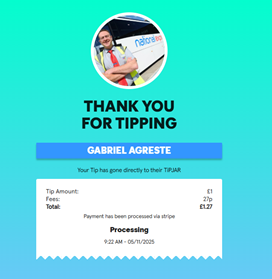
Here are the steps you need to follow to customise your thank you page
1. Log in to your account
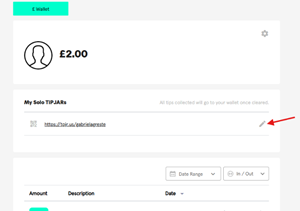
2. Click on the pencil icon under 'My Solo TiPJAR's'
3. Click ‘Configure your thank you page’ and turn on the toggle.
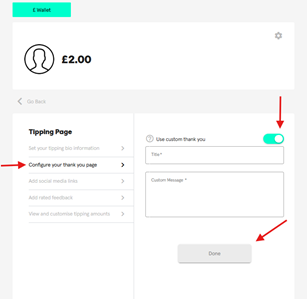
4. After this has been done, you can set your custom thank you message
5. Make sure to save it by clicking ‘Done’
Was this article helpful?
That’s Great!
Thank you for your feedback
Sorry! We couldn't be helpful
Thank you for your feedback
Feedback sent
We appreciate your effort and will try to fix the article