You can easily set/update your bank details by following these simple steps:
- Log in to your TiPJAR account.
- Click on the Settings cog in the top right corner.
- Select "Manage Your Bank Details."
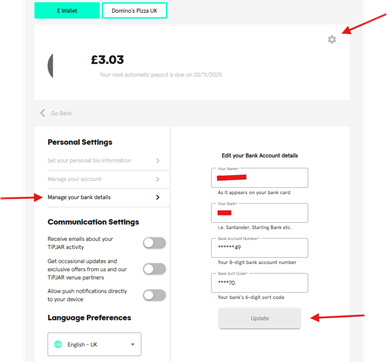
- Your current banking information will be displayed - click to edit.
- Once updated, be sure to click "Save " to confirm.
After you’ve saved your bank details, please allow a few minutes for our system to verify the details. Once it has been verified, then you should be able to withdraw your tips.
Was this article helpful?
That’s Great!
Thank you for your feedback
Sorry! We couldn't be helpful
Thank you for your feedback
Feedback sent
We appreciate your effort and will try to fix the article